Text message alerts
Found It Golf members can choose to get text messages (SMS) about their registered golf clubs and gear. Text alerts are optional. Found reports always reach members by email, whether or not they add a phone number.
How to opt in
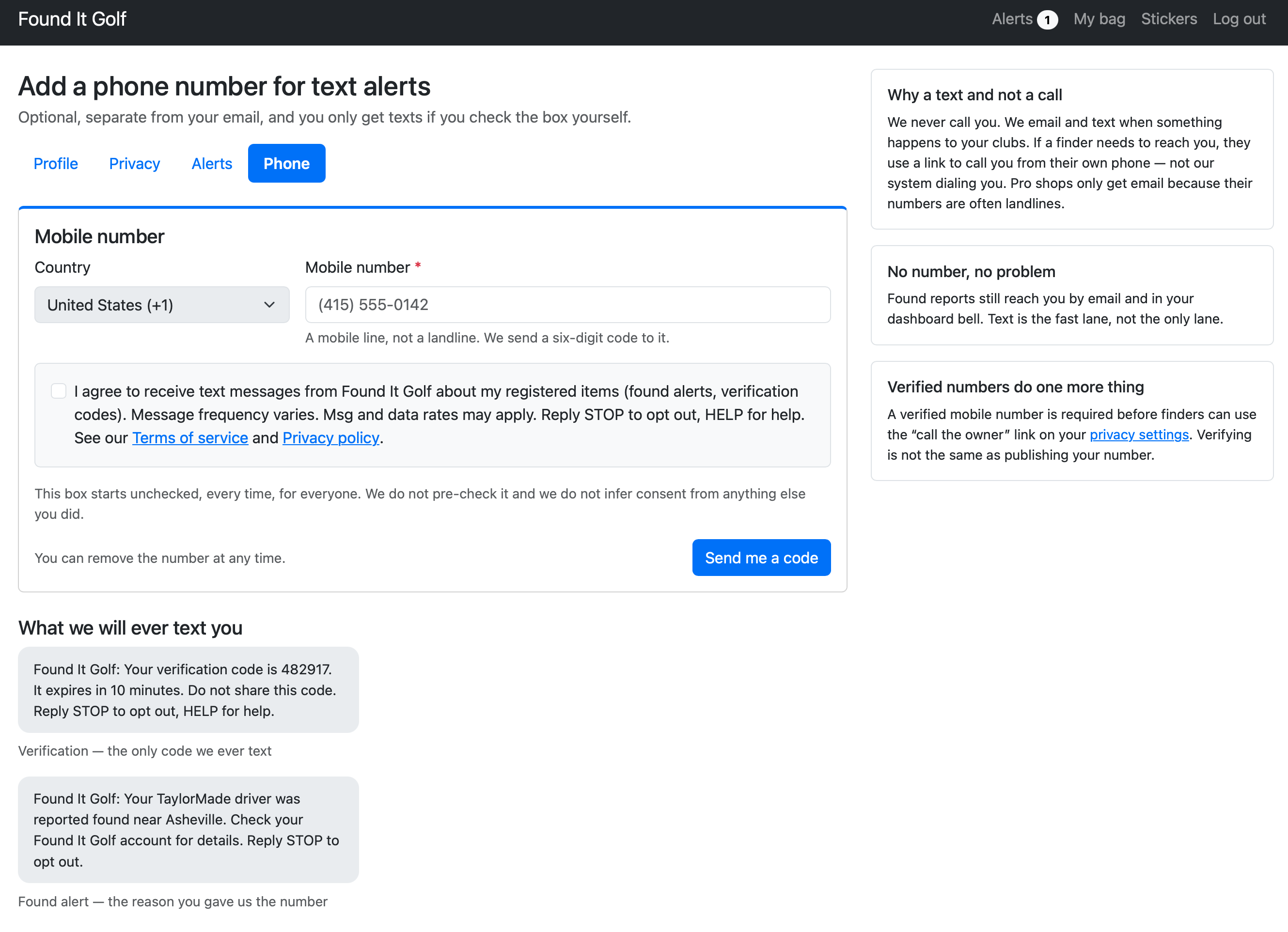
Members opt in from the Phone tab of their Found It Golf account settings:
- Enter a mobile phone number.
- Check the consent box. It is never checked for you, and the “Send me a code” button stays off until you check it yourself.
- Enter the one-time verification code we text to that number. We send no other messages until the number is verified.
The consent box reads:
I agree to receive text messages from Found It Golf about my registered items (found alerts, verification codes). Message frequency varies. Msg and data rates may apply. Reply STOP to opt out, HELP for help. See our Terms of service and Privacy policy.
Agreeing to receive text messages is not a condition of any purchase. We never buy phone numbers, get them from third parties, or add a number without the member’s own action.
The opt-in screen
The phone page is inside the member account, so it is shown here:
What we text
We send two kinds of account notifications, and nothing else:
- Phone verification code, sent once when you add a mobile number:
Found It Golf: Your verification code is 482917. It expires in 10 minutes. Do not share this code. Reply STOP to opt out, HELP for help. - Found alert, sent when someone scans your sticker and reports finding your item:
Found It Golf: Your TaylorMade driver was reported found near Asheville. Check your Found It Golf account for details. Reply STOP to opt out.
We do not send marketing or promotional text messages. Message frequency varies based on your account activity.
Opting out and help
- Reply STOP to any message to stop all texts. You may also reply END, CANCEL, UNSUBSCRIBE, or QUIT. We send one confirmation and nothing after that.
- Reply START to opt back in.
- Reply HELP for help, or email [email protected].
- You can also remove your number from your account settings at any time.
Message and data rates may apply. Wireless carriers are not liable for delayed or undelivered messages.
Your privacy
We do not sell or share your SMS opt-in data or personal information with third parties for marketing purposes. See our Privacy policy and the text messaging section of our Terms of service.